Skip to content

THE APP, UP CLOSE.

A lot goes into
a good change.

Here’s what you’ll find in Spalt.
Take a look. Get into the details that matter to you.

Find your next favourite feature

Review & commit

Make the change yours.

From the first changed line to the last look before push.

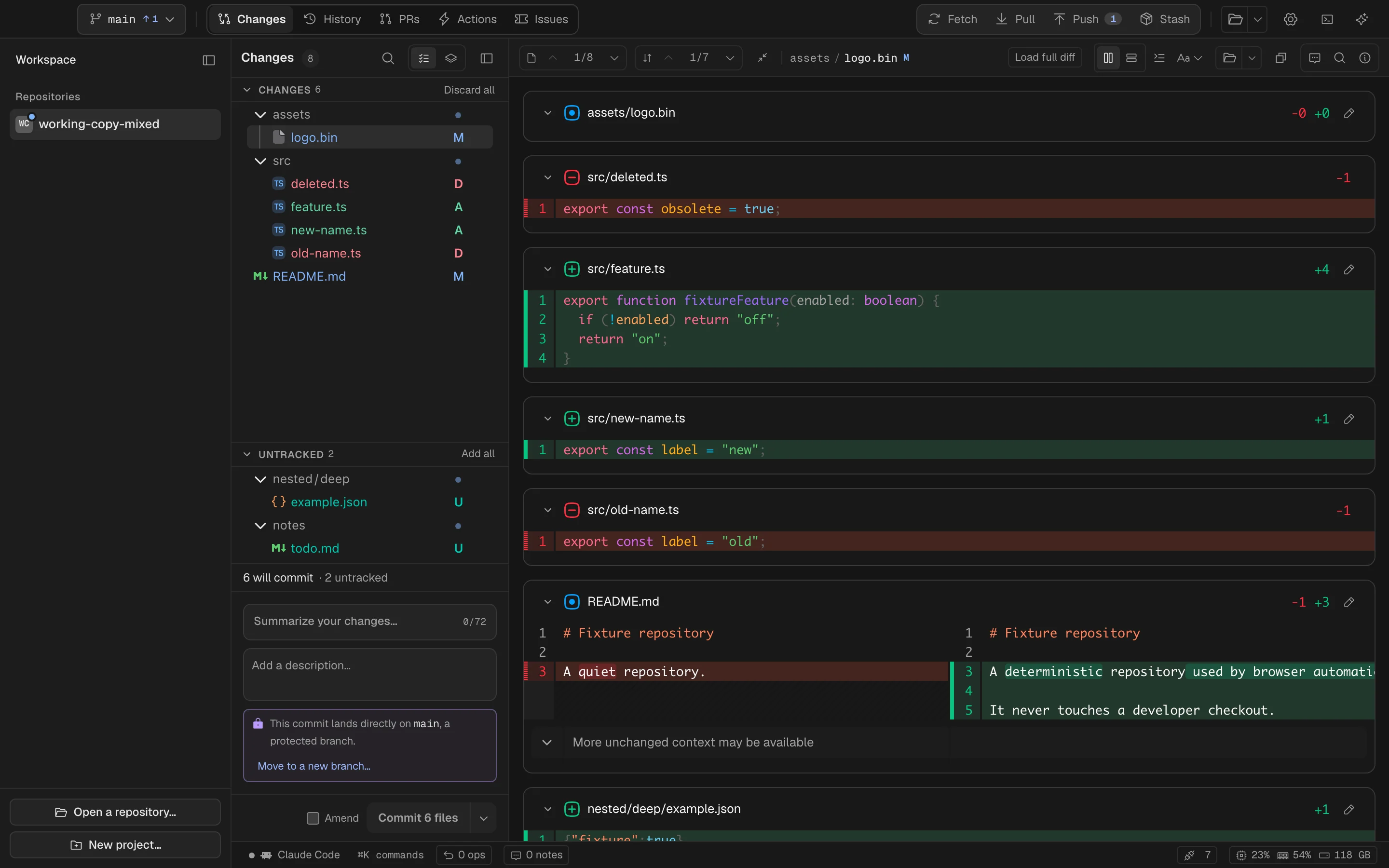
Changes

See the change. All of it.

Your files and their diffs, side by side. Follow the detail without losing your place.

Spalt for Mac Dark
Spalt's Changes view with the tree, a split diff and the commit box
The finer details

One honest list of what you changed, and the diff beside it.

The tree and the diff move together, so the file you point at is the file you read. Split or unified, word-level highlighting, per-file collapse, scroll-spy, ⌘F find in diff, ⌥J/⌥K from change to change. A protected branch says so before the commit lands and offers a new branch instead.

  • Every verb on the row's ⋯ menu — no checkboxes anywhere
  • Don't commit this file holds a file back where you can see it
  • ⌘E edits the file in place when the typo is right there
Line staging

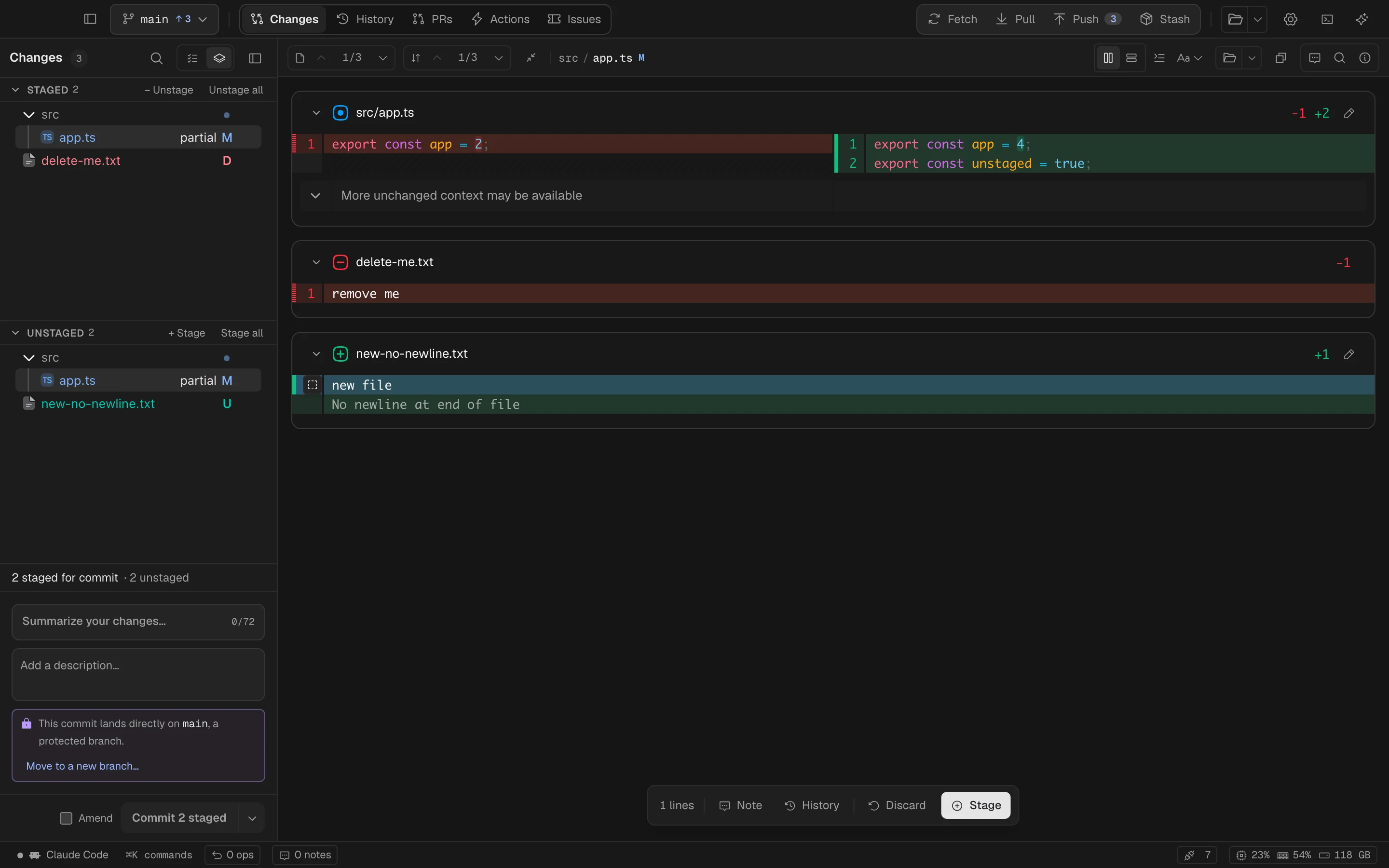
Just the lines you mean.

Pull one good change out of a busy file. Stage a line, a range, or the whole thing.

Spalt for Mac Dark
A range of changed lines selected in the diff, with Stage offered for just those lines
The finer details

Take exactly the lines you mean.

Press on a line number, drag, and stage or unstage just those. Spalt assembles a minimal patch and runs git apply --cached --check before the index is touched; a failed check changes nothing. No-newline-at-EOF, CRLF, deletion-only selections, partial new files — each one a named test against a real git.

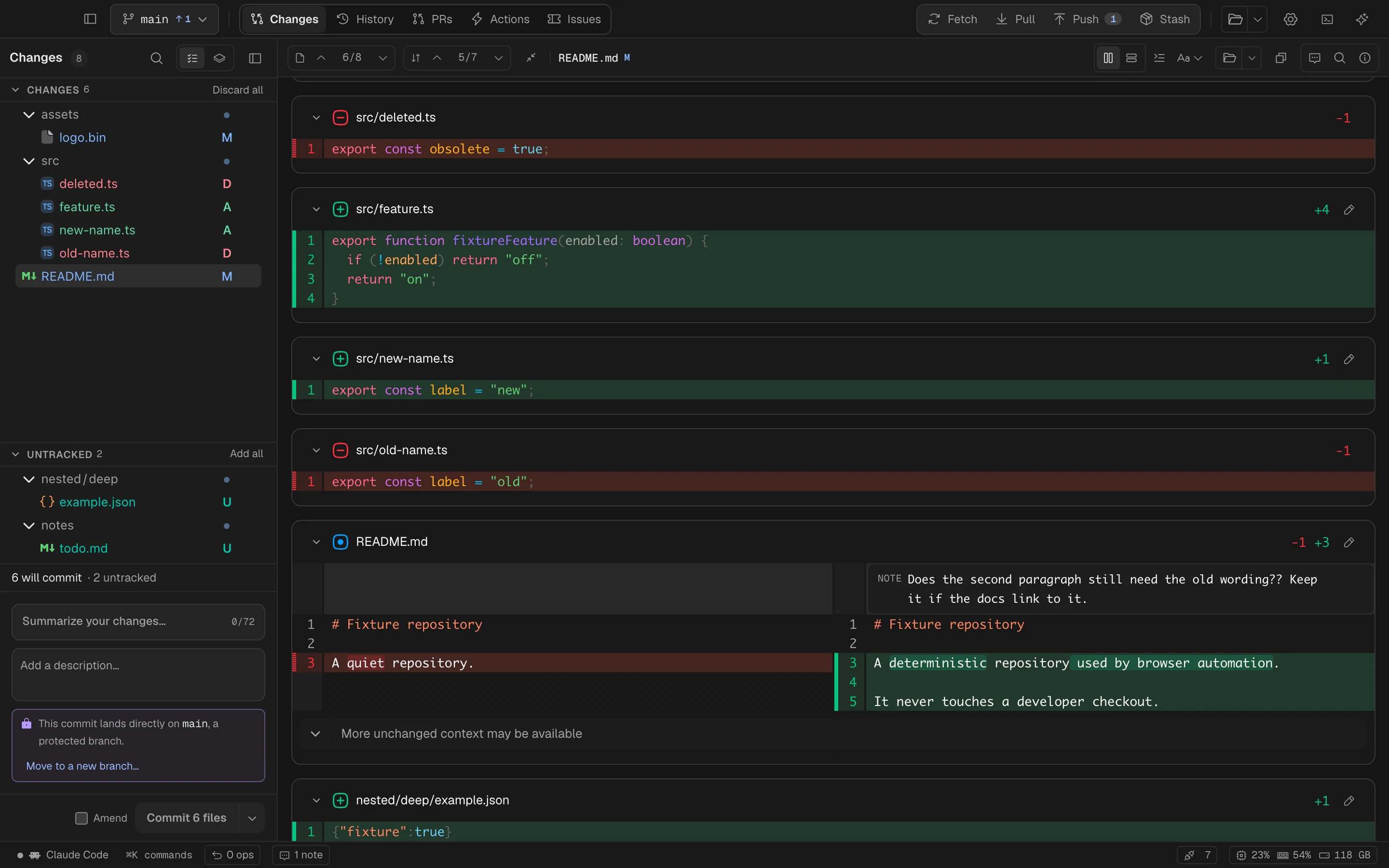
Review notes

Keep the thought with the code.

Leave a question on a line. Mark a file reviewed. Pick up the thread after a rebase.

Spalt for Mac Dark
A review note being written on README.md in Spalt
The finer details

Leave the note beside the code, and come back after a rebase.

Hover a line, note it; drag a range, annotate it; note a whole file from the toolbar. Notes live in the repository's .git, invisible to git status. Space marks a file reviewed with a fingerprint of its changed lines, so the mark survives a rebase that merely moves hunks and dies the moment the content changes. A note with ?? is a question; the rest are directives — and one click hands all of them to the assistant, questions answered first, directives returned as proposed diffs.

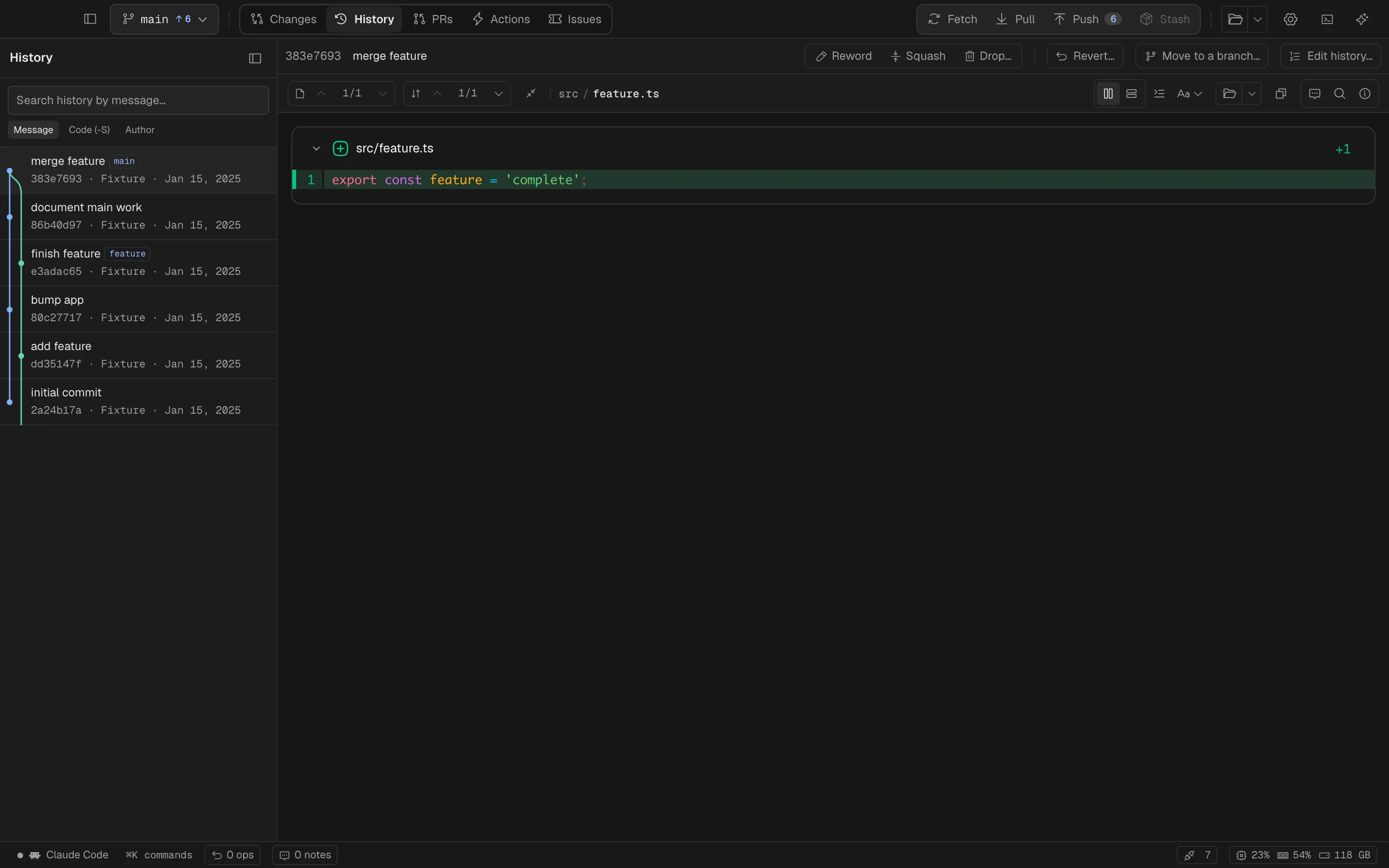
History

Give your history a little clarity.

Find the commit. Follow a file. Reword, reorder, or undo when the story needs a different ending.

Spalt for Mac Dark
Spalt's History view with the lane graph and a commit's diff open
The finer details

A database, not a scrolling list.

Lane graph, search by message, author or content (git log -S), file history that follows renames, line history for a selection, blame with a drill-down to the parent. Reword, squash, drop and reorder run in memory: a plan that conflicts aborts with the repository untouched. Every ref-moving operation is journaled, and ⌘Z walks it back.

  • Revert for a pushed commit, never a force push
  • Move to a branch for the commit that should not have been on main
  • Uncommit brings a commit back into Changes, with its message

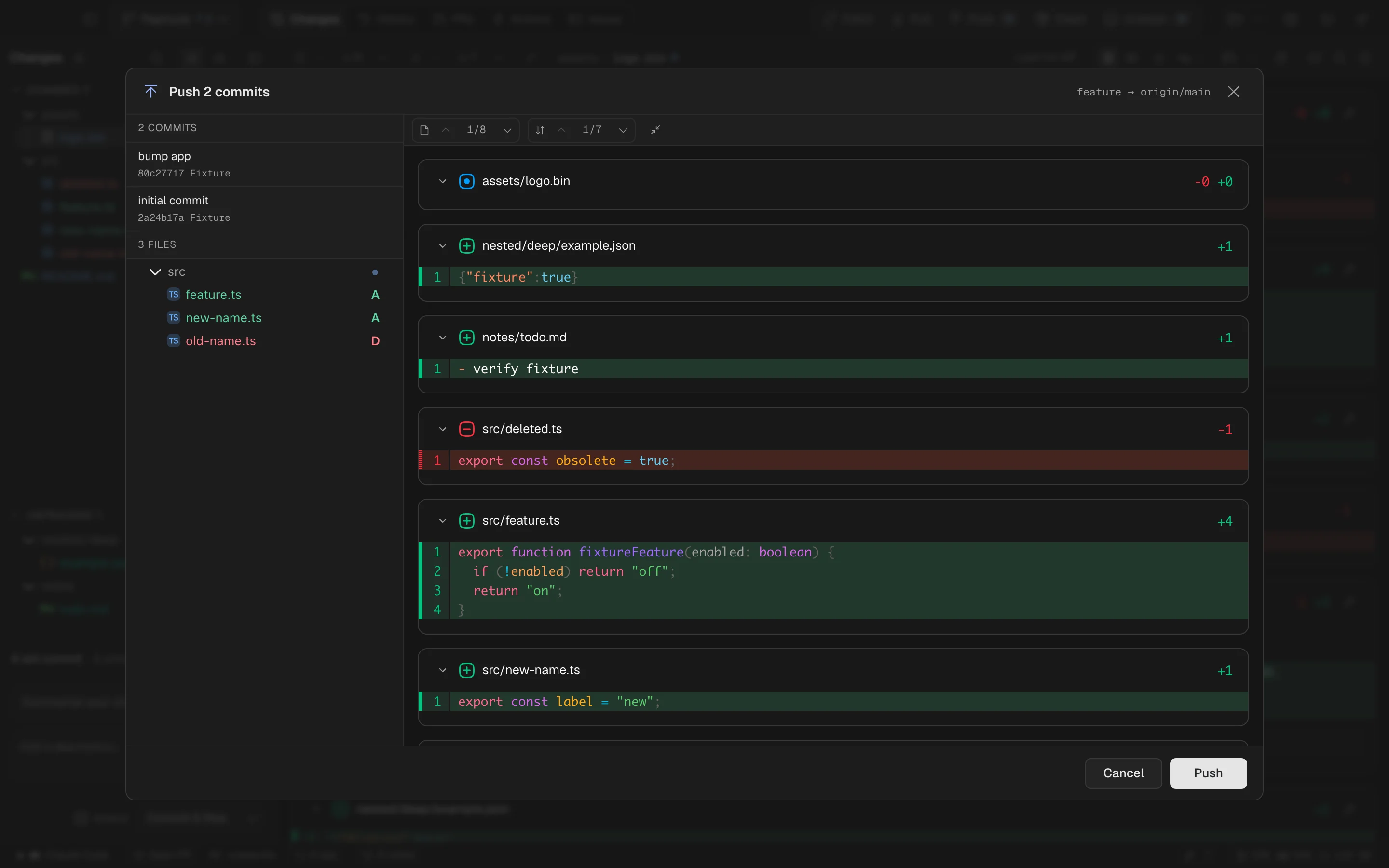
Push

One last look before it goes.

See the commits, files, and lines you’re about to push. Bring a commit back if it needs another pass.

Spalt for Mac Dark
Spalt's push dialog listing the commits about to be pushed with one selected
The finer details

Look before the leap.

The push dialog lists the commits going out, one at a time, with their files and diffs — and Uncommit is right there for the one that should not go. A branch whose name the remote already owns is refused with the divergence spelled out and both ways out in the dialog. --force does not exist in the codebase: only --force-with-lease, behind a confirm, and never on a protected branch.

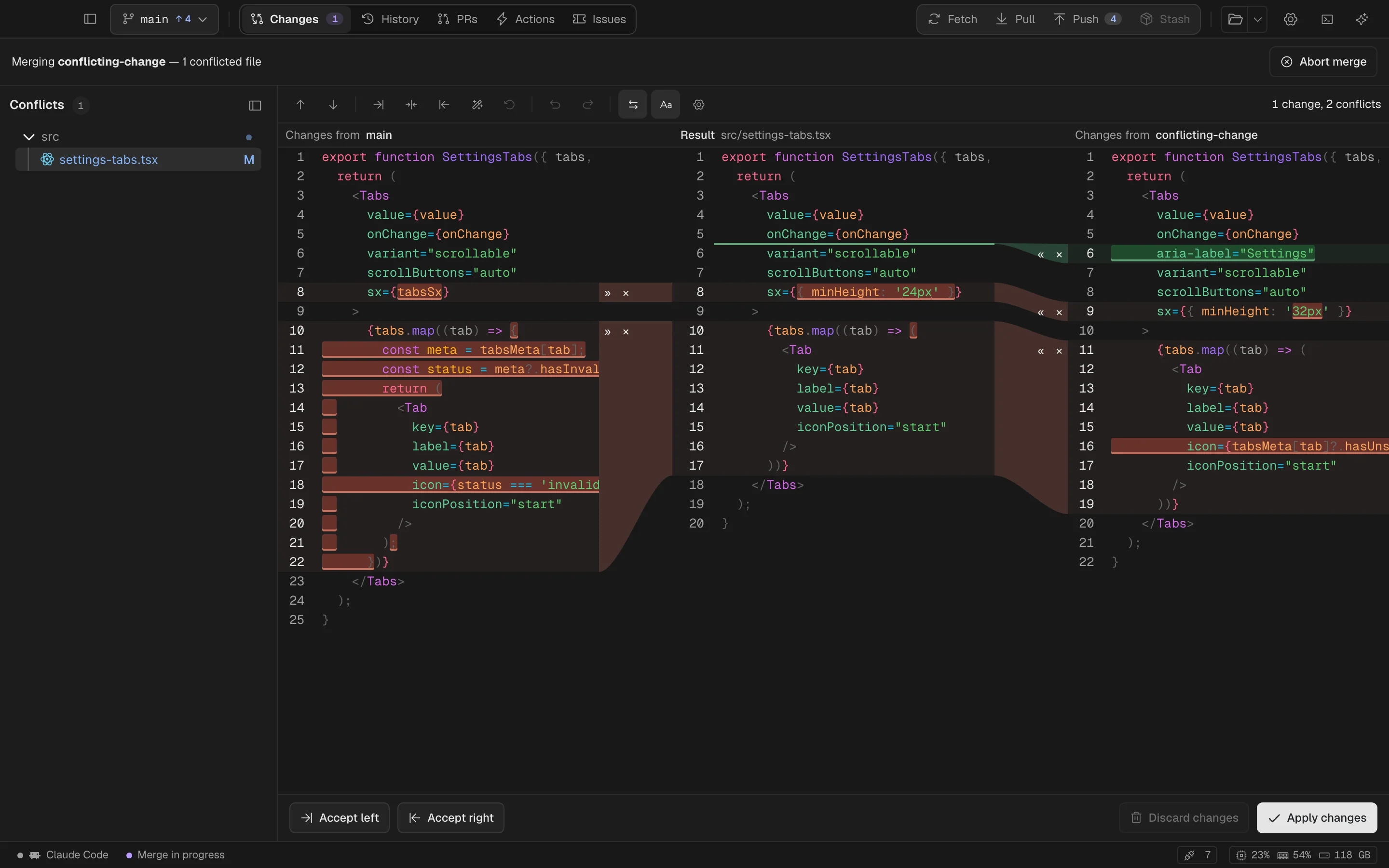
Merge conflicts

Two sides. Your resolution.

Compare yours and theirs with the result in the middle. Resolve a chunk or edit the answer yourself.

Spalt for Mac Dark
Spalt's three-pane merge resolver with a conflict and its per-change arrows
The finer details

Yours, the result, theirs.

A three-pane resolver in the JetBrains mould: per-change arrows on the lane, character-exact word marks that re-measure as you type, resolve automatically where the sides touched different words, whitespace policies, folds, and one undo history for chunk actions and typing alike. The line structure comes from the index's three stages, never from markers in the file.

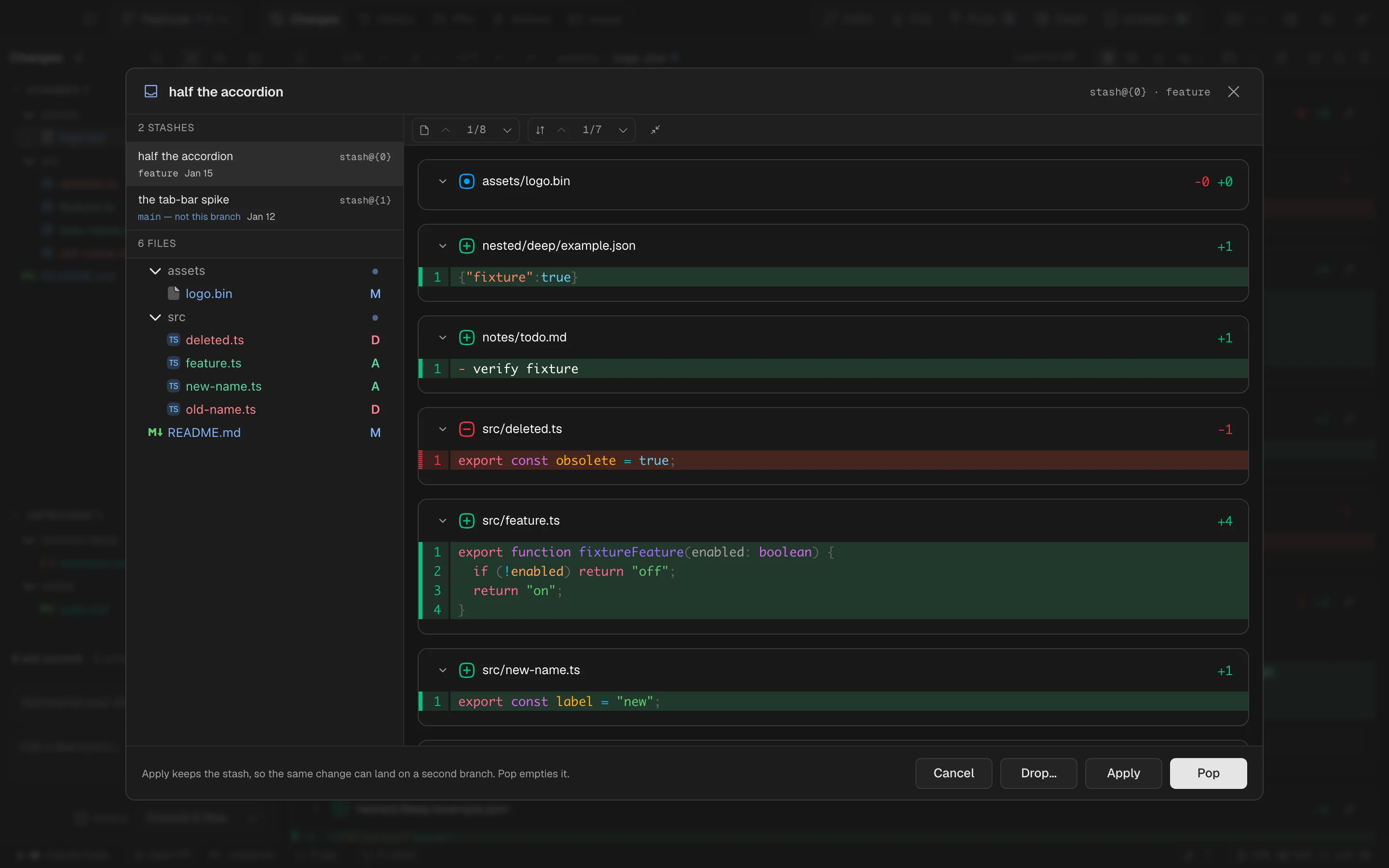
Stash

Leave it for later.

A stash is still your work. Preview what’s inside before you apply it, pop it, or let it go.

Spalt for Mac Dark
Spalt's Unstash dialog with the stashes listed and the selected one's diff
The finer details

Read the stash before it lands.

Stash asks for a title in git's own format. Unstash opens the same review frame a push gets: every stash with its age and branch, the files, every line it would write — then Apply, Pop or Drop. Untracked files are in the preview, because they are usually the point.

Issues & pull requests

Keep the whole story together.

The brief, the branch, the checks, the conversation.

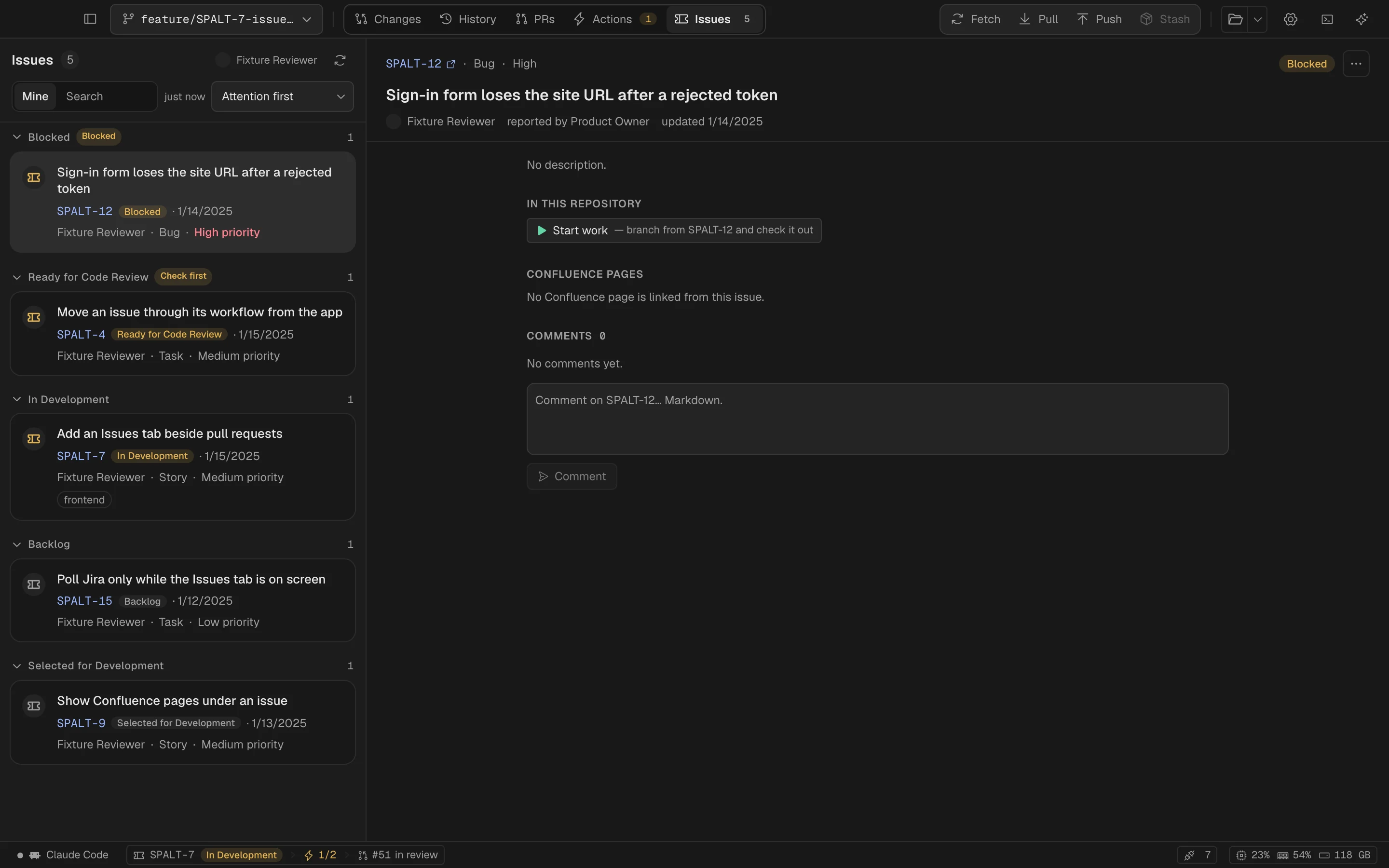
Jira

Start with the why.

Your assigned issues, comments, and linked Confluence pages. Turn the ticket into a branch and get to work.

Spalt for Mac Dark
A Jira issue open in Spalt
The finer details

Spalt connects the Jira issue, branch, commits, checks, and pull request through the issue key in the branch name. The statusbar keeps the issue, checks, and pull request visible throughout.

Start work · Issues

A branch named after the ticket, from origin/main; the ticket moves to In Progress.

Commit · Changes

The key prefixes the commit; the statusbar carries the issue from here on.

Publish · Push

The receipt offers Open pull request; the form arrives prefilled from the issue.

Checks · Actions

A checks segment appears the moment CI starts; red means a fix, from the same window.

Review and merge · Pull requests

Approve, request changes, merge — then one dialog offers the ticket's last transition.

Transition, comment, and link are the only things Spalt writes to Jira, each from a click. A pull request merged elsewhere still shows the ticket’s open status in the strip.

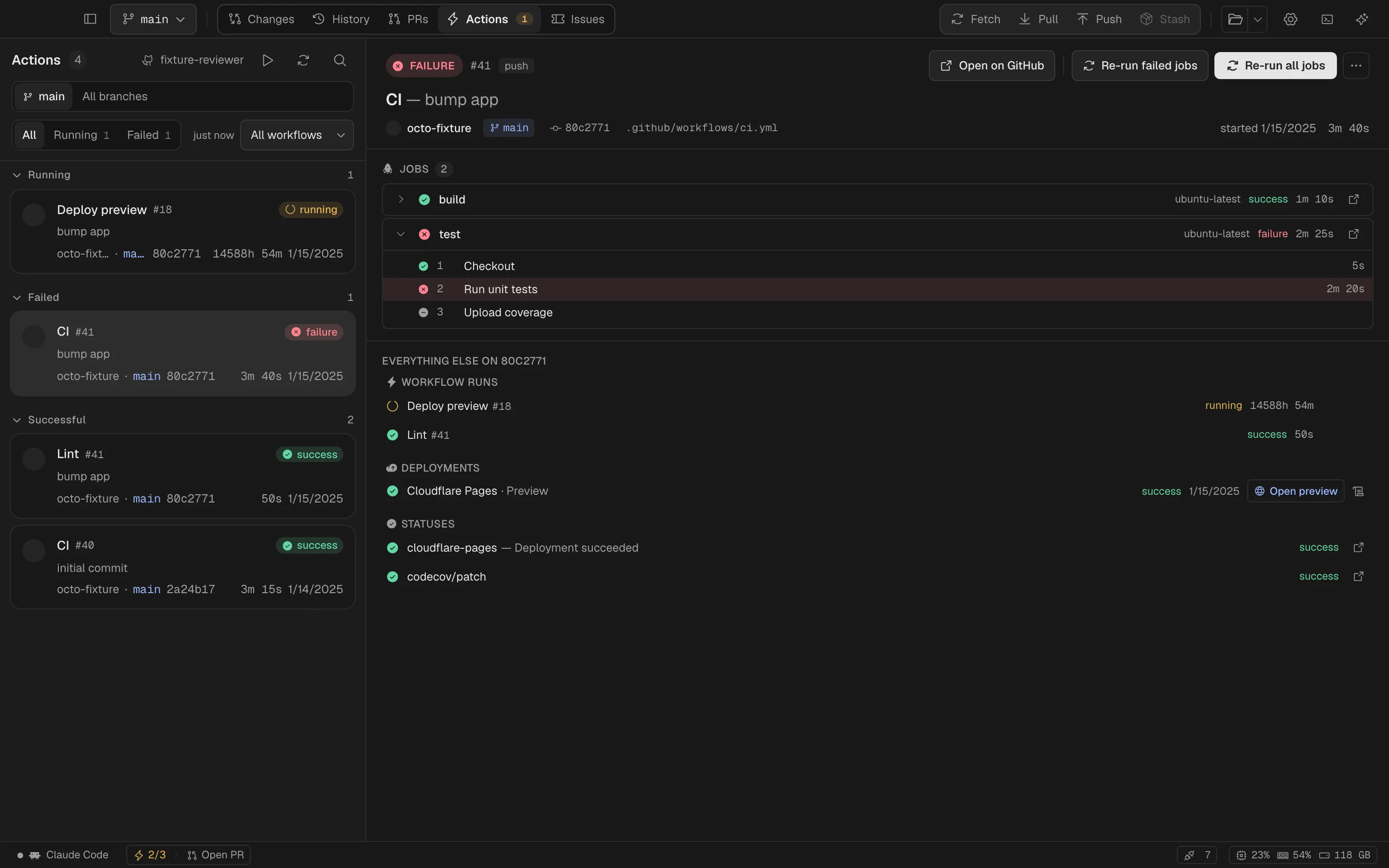
GitHub Actions

Know when the checks are in.

Follow jobs and steps, open a deployment preview, or re-run a check. Keep the result next to the code that caused it.

Spalt for Mac Dark
GitHub Actions jobs and steps in Spalt
The finer details

Actions and deployments

Jobs and steps, re-run and cancel, dispatch; Cloudflare Pages previews under the commit.

CI on every commit

A dot in History for every commit GitHub has run something for.

Pull requests

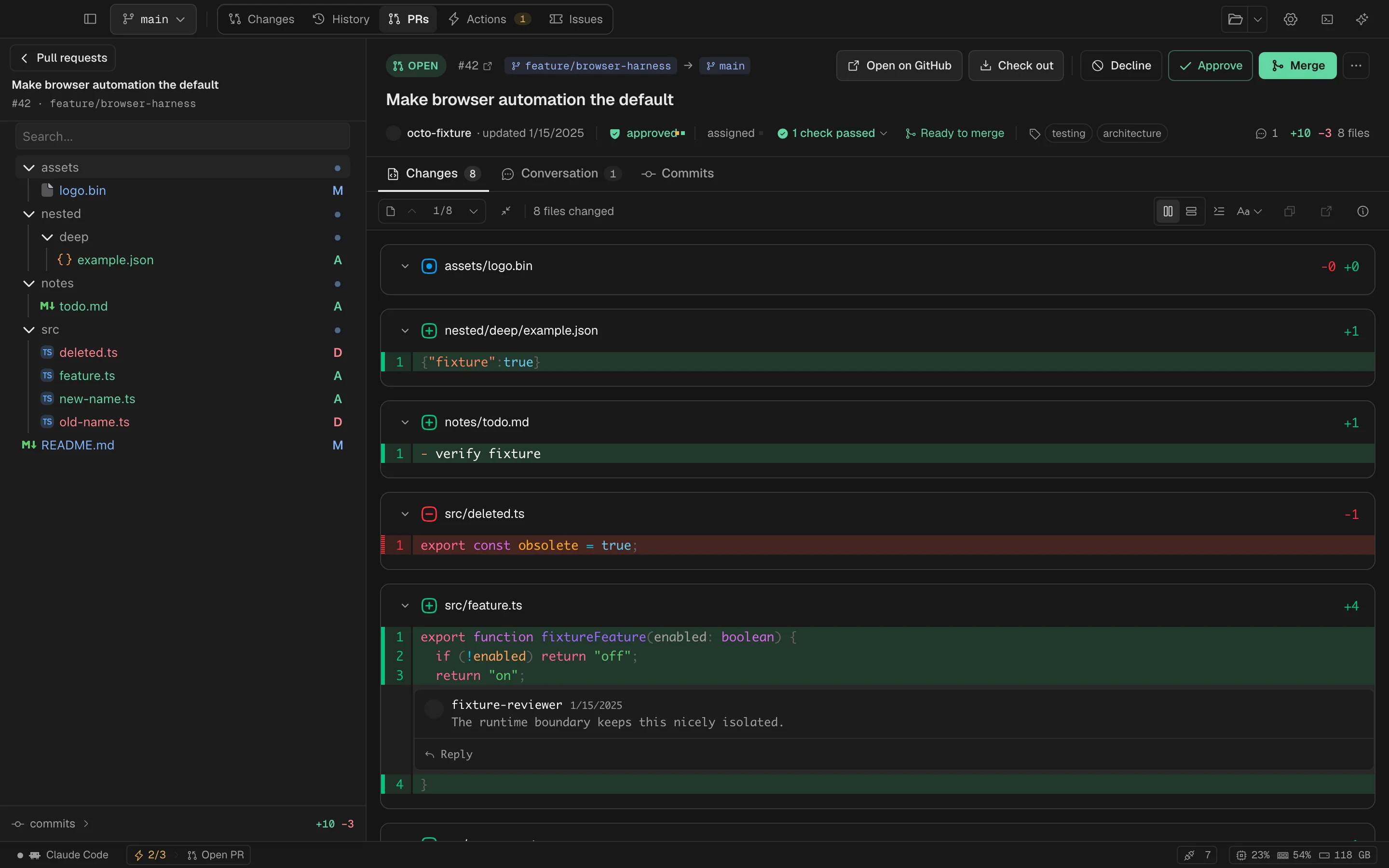
The conversation belongs here.

Read the diff, leave inline comments, approve or request changes. Take the pull request through to merge.

Spalt for Mac Dark
A pull request with code review and inline comments in Spalt
The finer details

Approve, request changes, merge — then one dialog offers the ticket's last transition.

Terminal

Your shell. Right underneath.

A command, a split, a coding agent. Keep the terminal with the repository and the work in view.

Spalt for Mac Dark
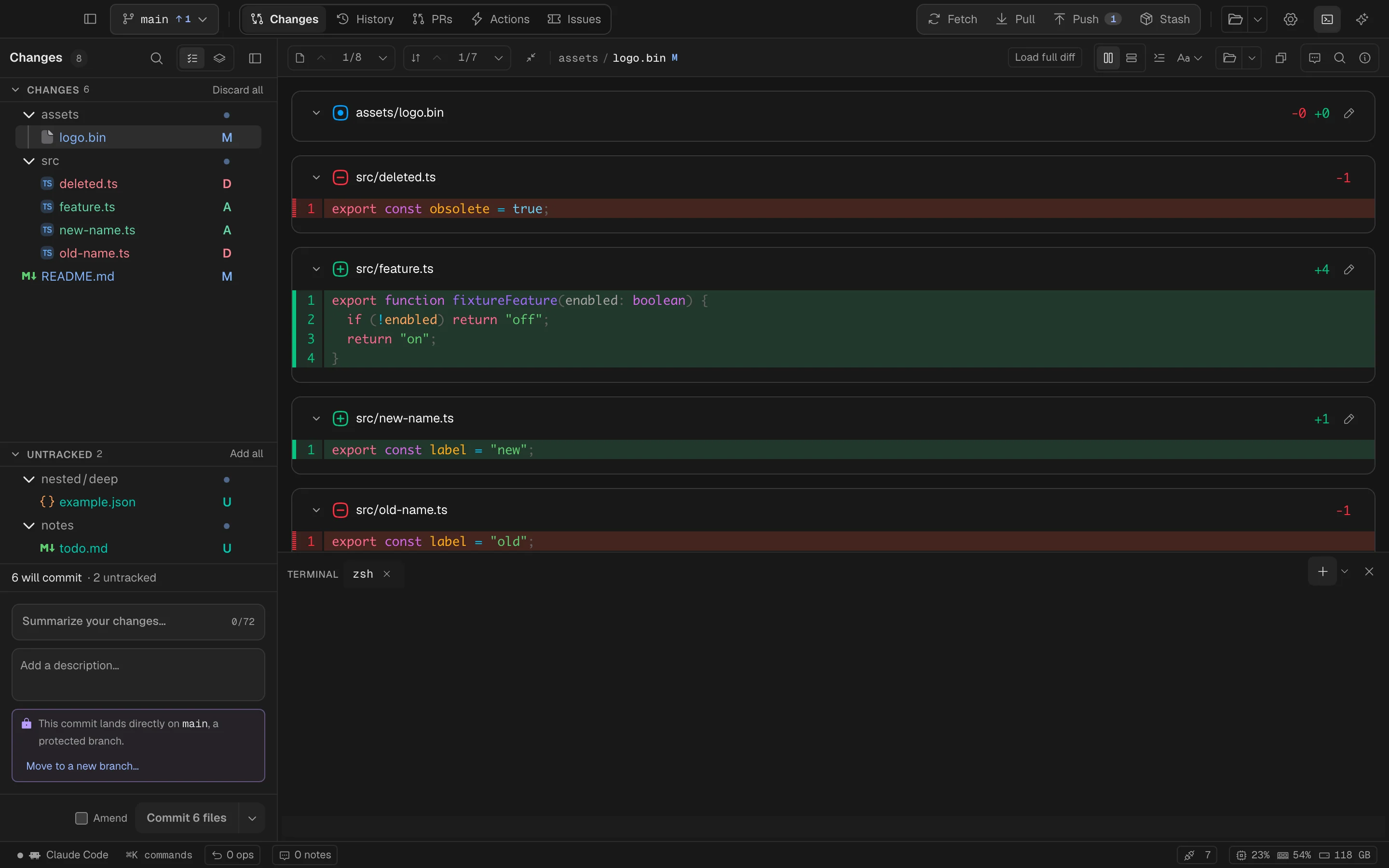
The terminal drawer open under the diff
The finer details

A shell, or an agent, under the diff.

Tabs and splits in the repository's directory, with Terminal.app's chords. Run Claude Code or Codex there under its own sign-in — or hand a whole Jira issue to one with Send to agent…, the prompt typed in and waiting. Sessions are owned by the Rust core: closing the drawer or switching repositories never ends a process.

Your assistant

Another perspective. Your call.

Bring the account you already use. Decide what to share.

Review & explain

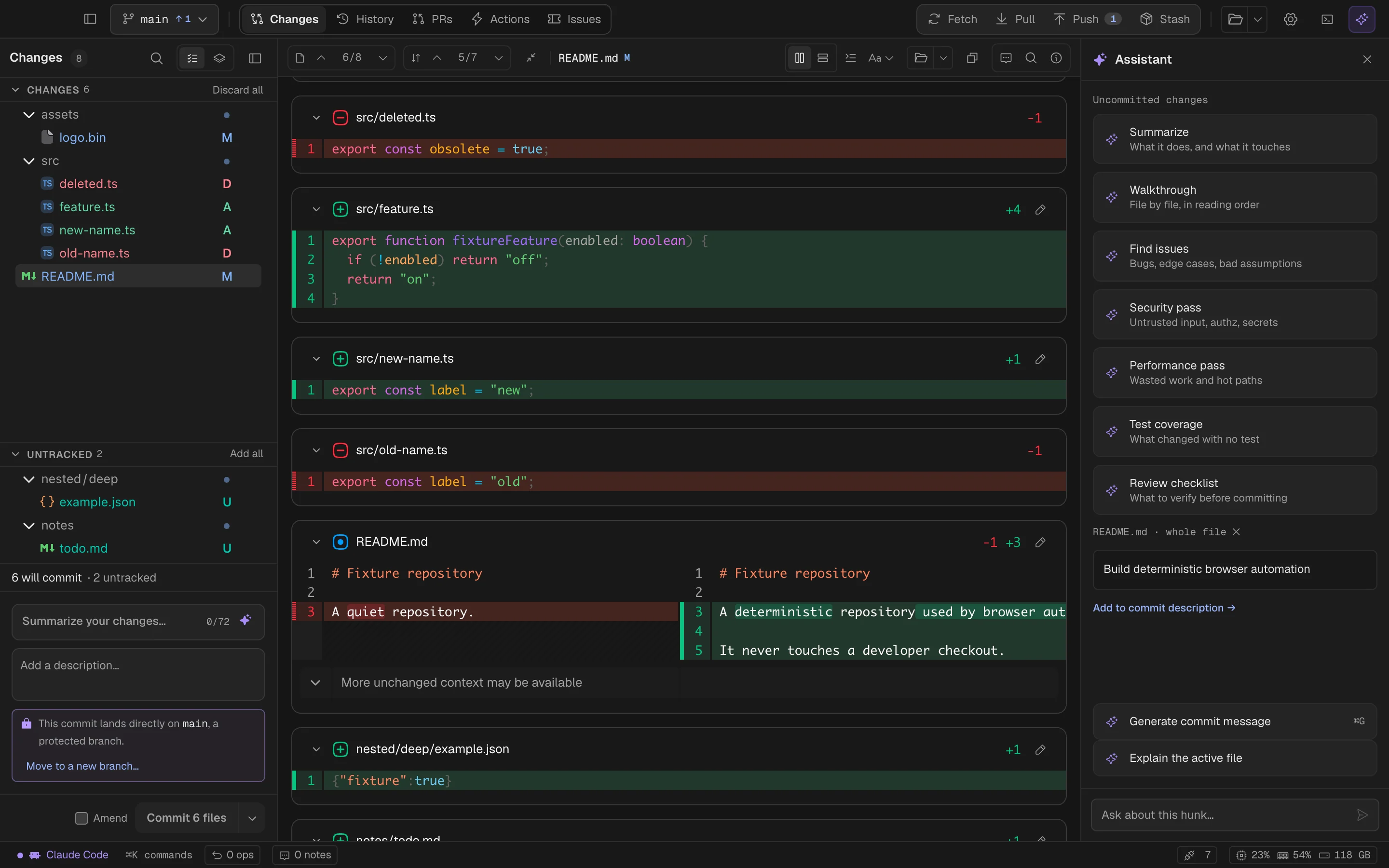
Ask about the unfamiliar bit.

Make sense of a hunk, check the whole change, or turn your review notes into a conversation.

Spalt for Mac Dark
Spalt’s assistant beside a code review
The finer details

Commit messages from the staged diff

⌘G writes the message from what will actually commit — the staged diff, never the working copy — in your style: match the history, conventional, or imperative. It streams into the box and stays a draft.

Explain, review, ask

The assistant panel (⌘J) explains a hunk or a file and takes follow-up questions. Seven review passes over the whole change: summarize, walkthrough, find issues, security, performance, test coverage, a checklist.

Your notes, answered

One click sends every review note: questions answered first, directives returned as proposed diffs — never applied on their own.

Accounts & models

Work with someone familiar.

Claude Code, Codex, OpenCode, or a local model. Choose an account and model for the work in front of you.

Spalt for Mac Dark
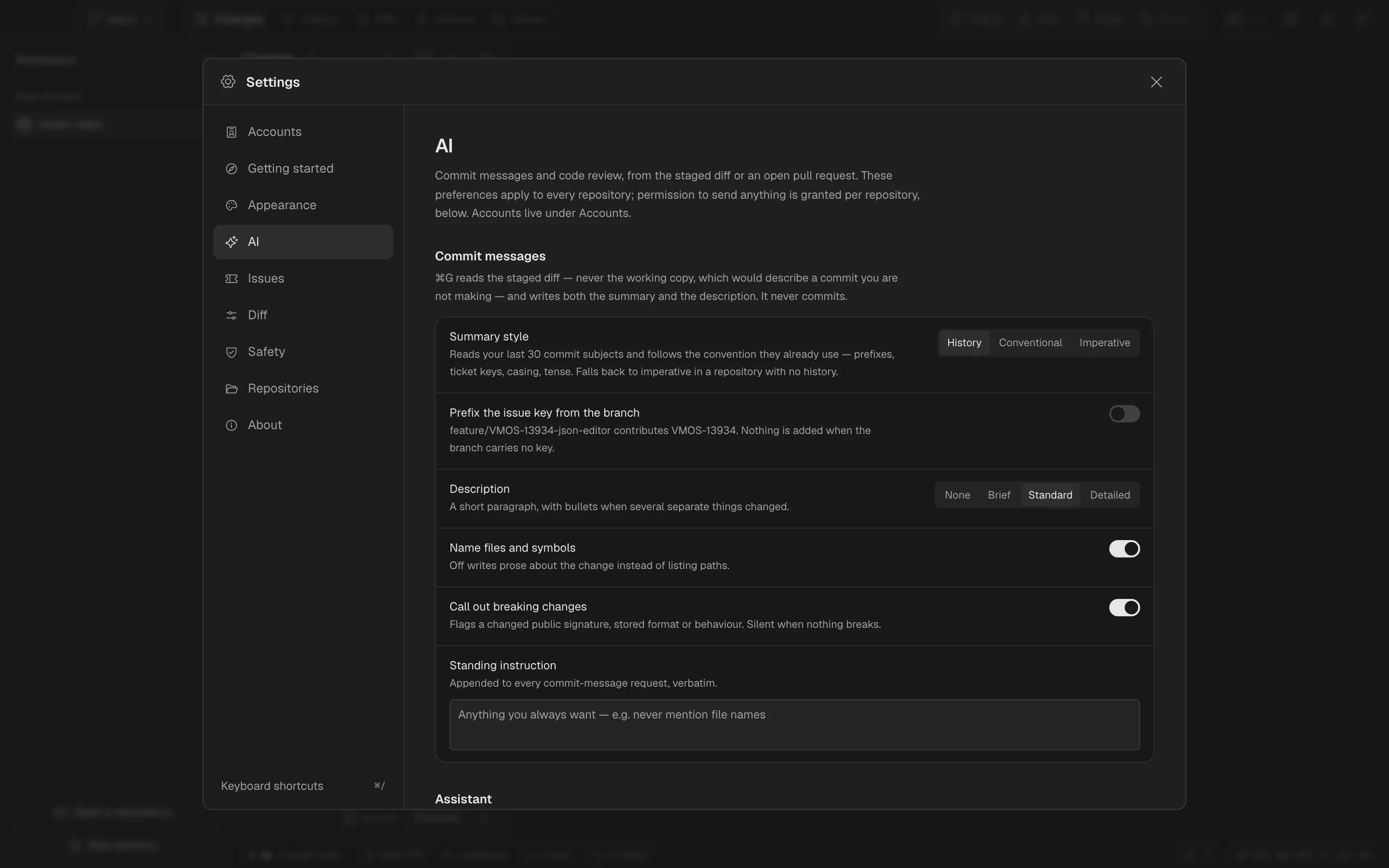
AI account and model settings in Spalt
The finer details

Accounts, not a provider

Several Claude Code subscriptions side by side, Codex, OpenCode; API keys for Anthropic, OpenAI, OpenRouter, Gemini, xAI, DeepSeek, Mistral, Groq, Kimi, Z.ai; Ollama and LM Studio locally, or any OpenAI-compatible URL. Assigned per repository, project or app default, with a model picker and a Stop button.

Agents in the terminal, and handed the issue

Claude Code and Codex run in the drawer under their own sign-in. Send to agent… composes the Jira issue — description, comments, links, Confluence pages — into a prompt and types it in. Atlassian's MCP server can be switched on for the agent to read Jira itself.

Your workspace

Settle into the day’s work.

A home for your projects, with a clear view of your Mac.

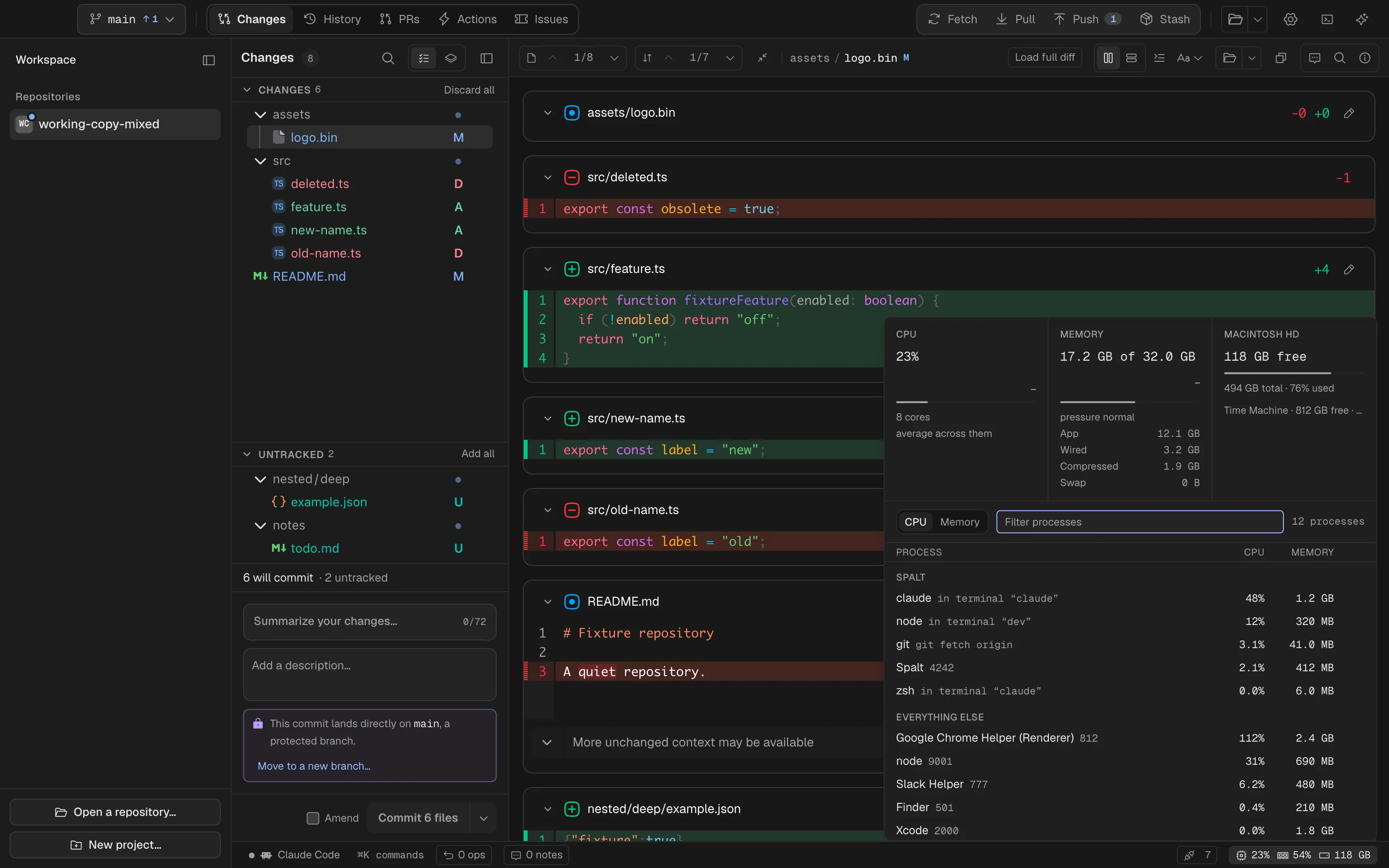
System activity

Find what’s working overtime.

See CPU, memory pressure, disk activity, and processes. Find the busy one without leaving your work.

Spalt for Mac Dark
System activity and processes in Spalt
The finer details

A git client that runs shells and coding agents is exactly where a runaway node gets noticed late. The right end of the statusbar carries CPU, memory pressure (the kernel's verdict, not a percentage) and the startup disk, quiet until they have something to say. Click it: tiles with two minutes of history, Activity Monitor's own memory rows, every volume — and the process table, everything Spalt spawned grouped first, then the machine by CPU or memory, with a filter that reaches any process. Quit asks; Force quit arms twice. Numbers are counted the way macOS counts them, so they match Activity Monitor.

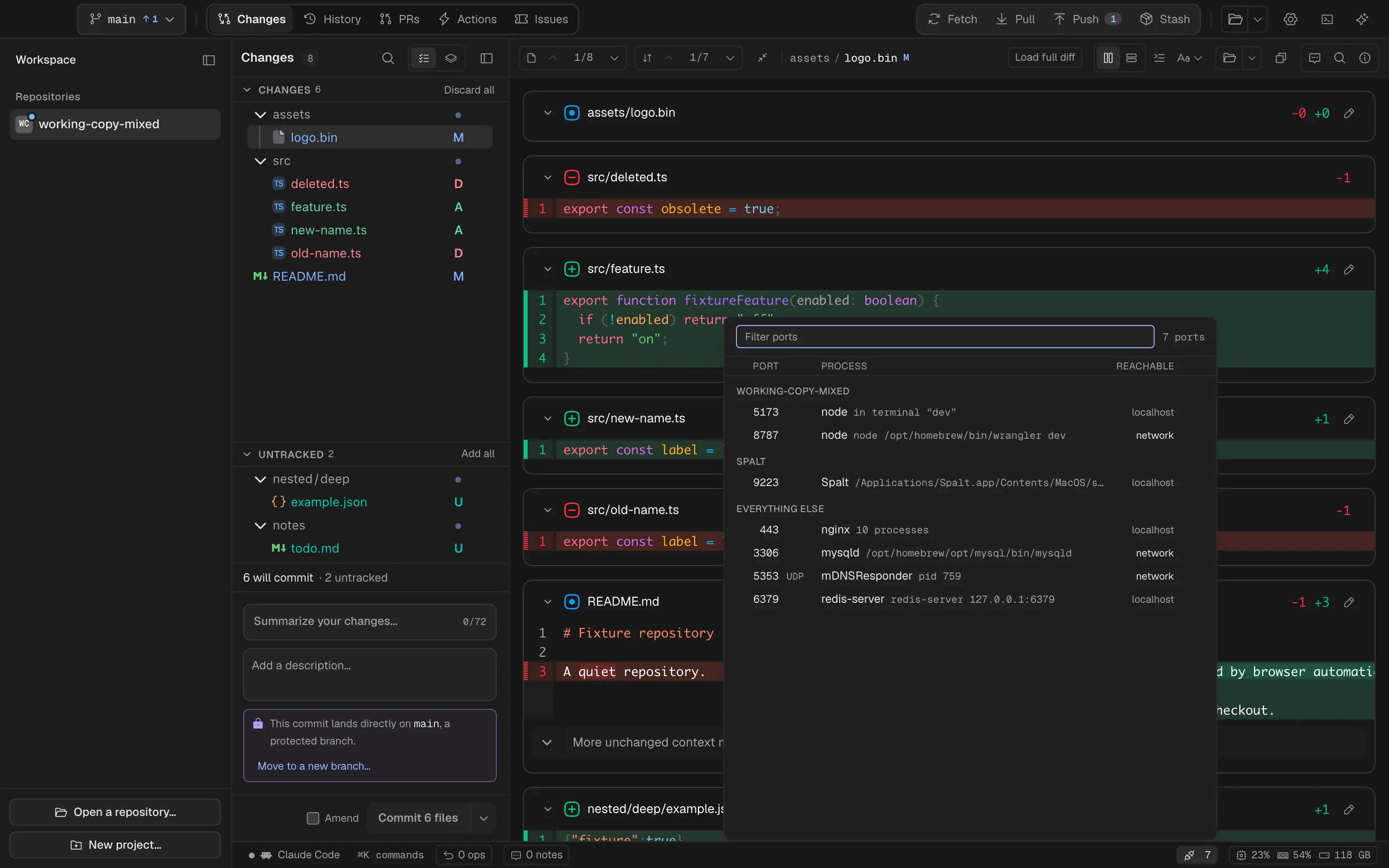
Listening ports

There’s your dev server.

Listening ports, grouped by project. Open the local preview or free up the port you need.

Spalt for Mac Dark
Listening ports grouped by project in Spalt
The finer details

A second chip counts the ports listening on this Mac. The panel groups them by how certainly they are yours — per open repository, then what Spalt started, then the rest — one row per port, not per process: a forked server is ten workers on one row, quit together. Each says whether it is reachable from localhost only or from the network, and Open http://localhost:5173 names exactly where the click goes. Read from the kernel, not from lsof, in a couple of milliseconds.

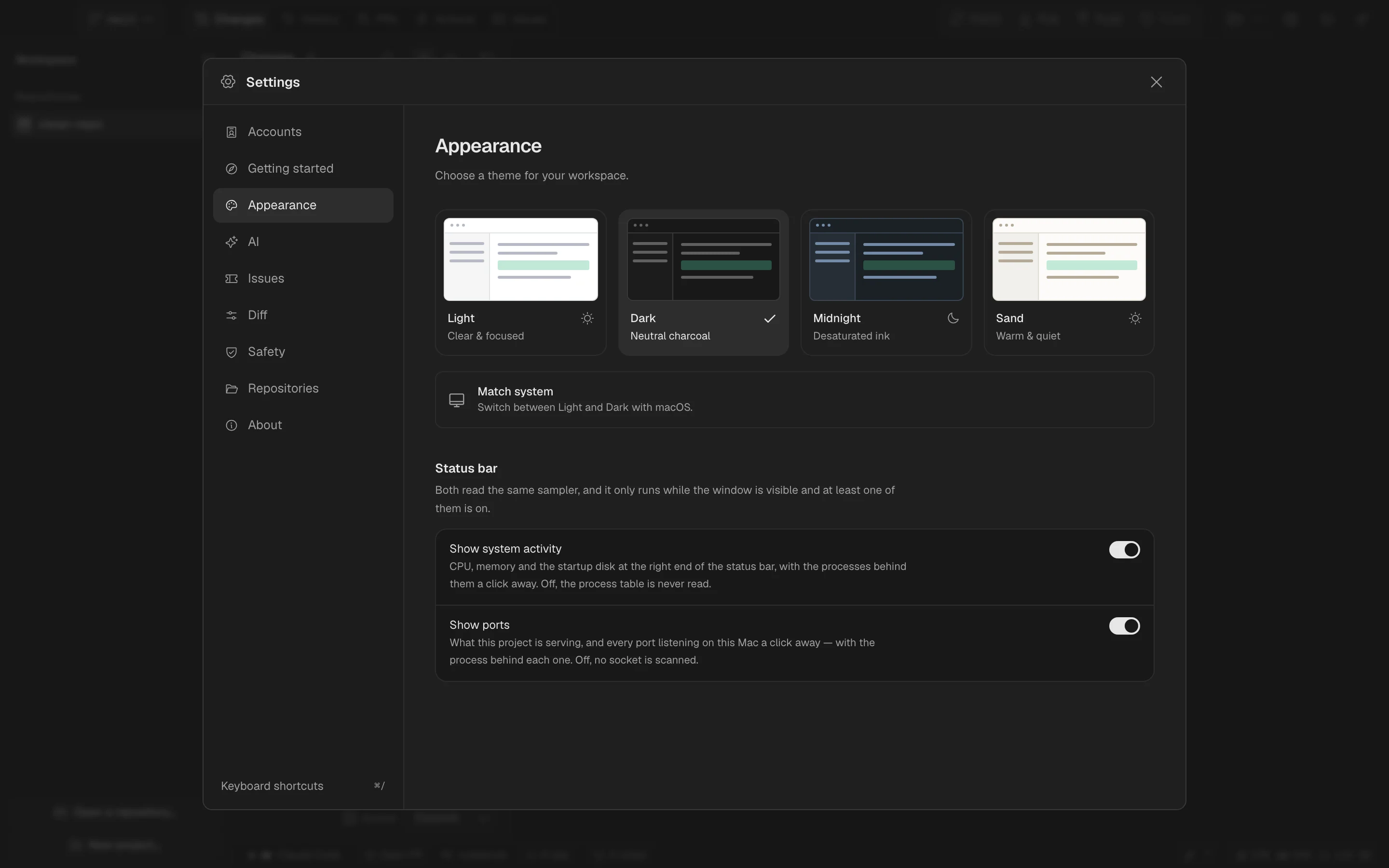
Appearance

Find your kind of quiet.

Light. Dark. Midnight. Sand. Use the finish that feels right, or follow your Mac through the day.

Spalt for Mac Dark
Spalt’s four appearance options
The finer details

Light, Dark, Midnight, Sand — or follow macOS. Reduced motion respected.

Projects

Make yourself at home.

Add your repositories, group them into projects, and pin the ones you come back to. Your workspace, ready for tomorrow.

Spalt for Mac Dark
Spalt’s first-run welcome and repository setup
The finer details

Projects

Repositories grouped and pinned in a sidebar that is a launcher, not a tab mirror.

A local identity

Rename a repository inside Spalt, give it letters, an emoji or its own logo.

Open in…

Finder, your editor, your terminal — with each application's own icon.

Clone, or add a folder

Paste a URL, or point at a folder of checkouts and get a project.

The spalt command

spalt opens the current repository; spalt path another.

THE LITTLE THINGS ARE BIG THINGS.

And the rest?
Already thought through.

The shortcuts, safeguards, and everyday comforts that make an app yours.

Working copy

Changes, or git's exact split

One honest file list by default; Staged / Unstaged when you need git's own view.

⌘-click commit scope

Select files the way you select them in Finder; the button reads Commit 3 selected.

Commit and push…

One verb, and the ordinary push confirmation still stands between you and the remote.

Signed commits

Through system git, so your gpg or ssh signing config just works.

Live updates

A filesystem watcher, never polling; the diff follows your editor as you type.

Branches and remotes

Branch switcher

New branch from main first, uncommitted work carried along; rename, delete with a merged check, merge into, pull into.

Compare two branches

Three-dot, like a pull request, in the full review surface — swap sides, not a dialog.

Fetch, pull, push

System git: your keys, credential helper, proxies. Progress streams into the titlebar.

A diverged pull asks

Merge or rebase, spelled out, with remember for this repository.

Protected branches

Warn before a direct commit, arm the push twice, never force, never rewrite pushed commits — each switchable.

Reading and editing

Diff options that stay

Words, strict words or characters; bars or +/−; hunk headers; tinted lines; whole file behind a patch.

Oversized files

Header only, with Load full diff keyed by content.

Diff summary

Files, hunks, +/−, notes and reviewed progress for what is on screen.

Blame and line history

Per-hunk bars, Blame parent at any depth, git log -L for a selection.

Workspace

Projects

Repositories grouped and pinned in a sidebar that is a launcher, not a tab mirror.

A local identity

Rename a repository inside Spalt, give it letters, an emoji or its own logo.

Open in…

Finder, your editor, your terminal — with each application's own icon.

Clone, or add a folder

Paste a URL, or point at a folder of checkouts and get a project.

The spalt command

spalt opens the current repository; spalt path another.

GitHub and Jira

Actions and deployments

Jobs and steps, re-run and cancel, dispatch; Cloudflare Pages previews under the commit.

CI on every commit

A dot in History for every commit GitHub has run something for.

Issues assigned to you

Grouped by status, attention first; JQL for anyone with a different list.

Confluence pages

The pages an issue links to, read here behind a fold.

Copy issue

The whole ticket as Markdown, in Jira's own words.

Yours to keep

Local-first

Pull requests, runs and issues paint from disk in the first frame and say how old they are; the repository is never cached.

A problem log

Every failure written down as it happens, secrets masked, with what to try — and Copy report.

One registry

The ⌘K palette, the shortcuts, the ⌘/ reference and the native menu are generated from one list.

Four finishes

Light, Dark, Midnight, Sand — or follow macOS. Reduced motion respected.

Updates with a click

A daily check that asks; a verified download; a restart that saves first.

YOUR WORK STAYS YOURS.

Nothing to hide.

No Spalt account, no analytics, and no crash reporting service. Local problem reports mask secrets and only leave when you choose to share them.

Read the privacy policy
Your git remotes

fetch, pull, push, clone

through the git on your Mac — your keys, your credential helper, your config

GitHub

after you sign in

pull requests, checks, Actions; the token stays in the Keychain and in Rust

Jira and Confluence

after you sign in

issues assigned to you, transitions and comments you click

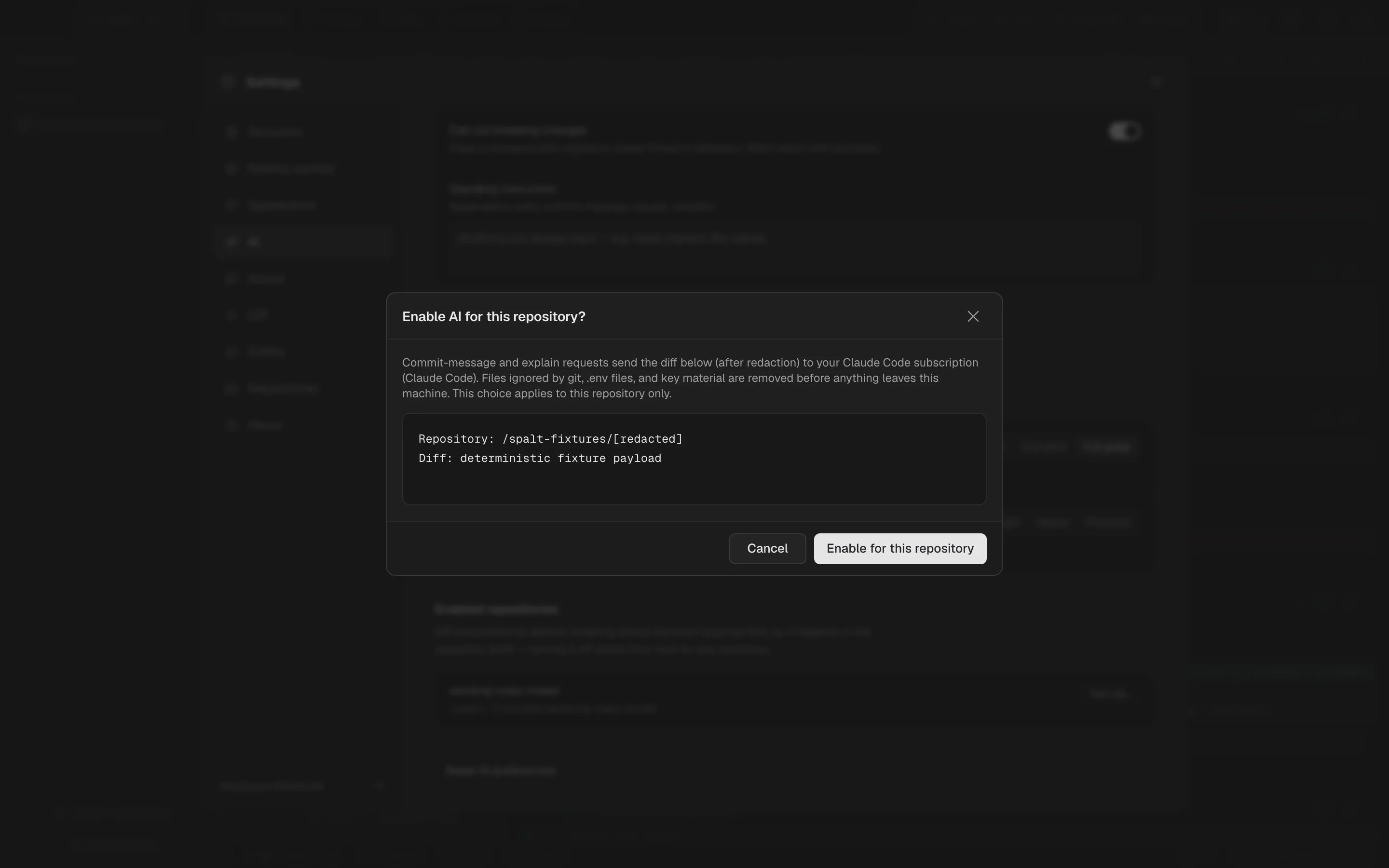
An AI account you chose

per repository, off by default

a staged diff or your notes, with .env, keys and ignored files stripped first; the first send shows exactly what leaves

spalt.dev

once a day

one request for /latest.json to see whether a newer version exists; it never installs without a click, and About switches it off

YOUR NEXT COMMIT DESERVES A BETTER VIEW.

Make a change.
Make it yours.

Not out yet. The public beta is on its way.
macOS 14.5 Sonoma or later · Apple silicon

Coming soon